TUDAT Propagator
IMPORTANT FOR TUDAT USE: TUDAT Propagator will only work once the astrodynamics resources are correctly placed inside the home directory. This is done automatically and checked by the API installer. This section will walk you through how to use the high-precision orbit propagator using TU Delft Astrodynamics Toolbox (TUDAT) on MDS. TUDAT has its own documentation page, showing how much can be achieved with it, but only a limited amount of functionalities are available to be used through MDS, tailored to the needs of MDS.
When the user's intent is to carry out high-precision orbit simulations, it is recommended to always use the API synchronization such that the simulation only proceeds when it is told so via the mds_api.step_sim function.
High-precision orbit propagation is computationally intensive, which can make MDS unresponsive with high number of satellites being simulated at the same time or with very high-fidelity simulations, and users should be aware of this when using the TUDAT propagator. Therefore, it is advisable to experiment first to see the computational load of a specific simulation and adjust the propagation settings accordingly.
How to use the TUDAT propagator?
The propagator is disabled by default in MDS, so the user should select it manually, which can be done easily as follows:
mds_api.set_propagator(sat_name: str, "Tudat")
The propagator should be selected before adding any satellites to the scene so that any settings that might be configured can take effect in the simulation. If the intention is to use the Tudat propagator for every body in the simulation, the sat_name argument can be set to None.
Propagator settings
Besides providing high accuracy, one of the key advantages of using TUDAT is that the orbit simulation is highly configurable/customizable, where the user can select which accelerations/perturbations, integrator, propagation method (Cowell, Encke, etc.), and environment model to use in the simulation.
The environment model may require explanation, as its nomenclature may be unfamiliar, and it refers to the settings that modify all the parameters other than the state variables being used to calculate the accelerations exerted on the propagated bodies (spacecraft). Examples of environment models are:
- For natural/celestial bodies:
    - Ephemeris
    - Rotation
    - Gravity field
    - Shape
    - Atmosphere
    - Radiation

- For spacecraft:
    - Aerodynamic properties
    - Radiation pressure properties
    - Rigid body properties (mass, center of mass, inertia tensor)
Pre-defined Propagator Settings
There are pre-defined propagator settings available for orbit simulations to ease the user experience, unless one intends to customize the settings.
Earth
There are 5 pre-defined propagator settings based on different orbital regimes for orbits around Earth:
- Common settings for the acceleration model:
    - Solar radiation pressure
    - 3rd-body perturbations (Sun, Moon, Jupiter, Venus)
    - Solid tides on Earth
    - Relativistic correction
    - Albedo and thermal radiation pressure by Earth
| Settings Name | Earth Spherical Harmonics (max. degree x max. order) | Extra accelerations |
|---|---|---|
| VLEO | 120 x 120 | Aerodynamic |
| Low-LEO (400–1000 km) | 100 x 100 | Aerodynamic |
| High-LEO (1000–2000 km) | 90 x 90 | – |
| MEO | 50x50 | Mars 3rd-body |
| GEO | 8x8 | Mars 3rd-body |
These settings are determined based on an analysis conducted on the perturbation magnitude of each acceleration type. The analysis yielded the mean acceleration magnitudes as a function of orbital altitude and the Earth spherical harmonic gravity acceleration based on different degrees and orders. Some examples for the figures obtained are given below.
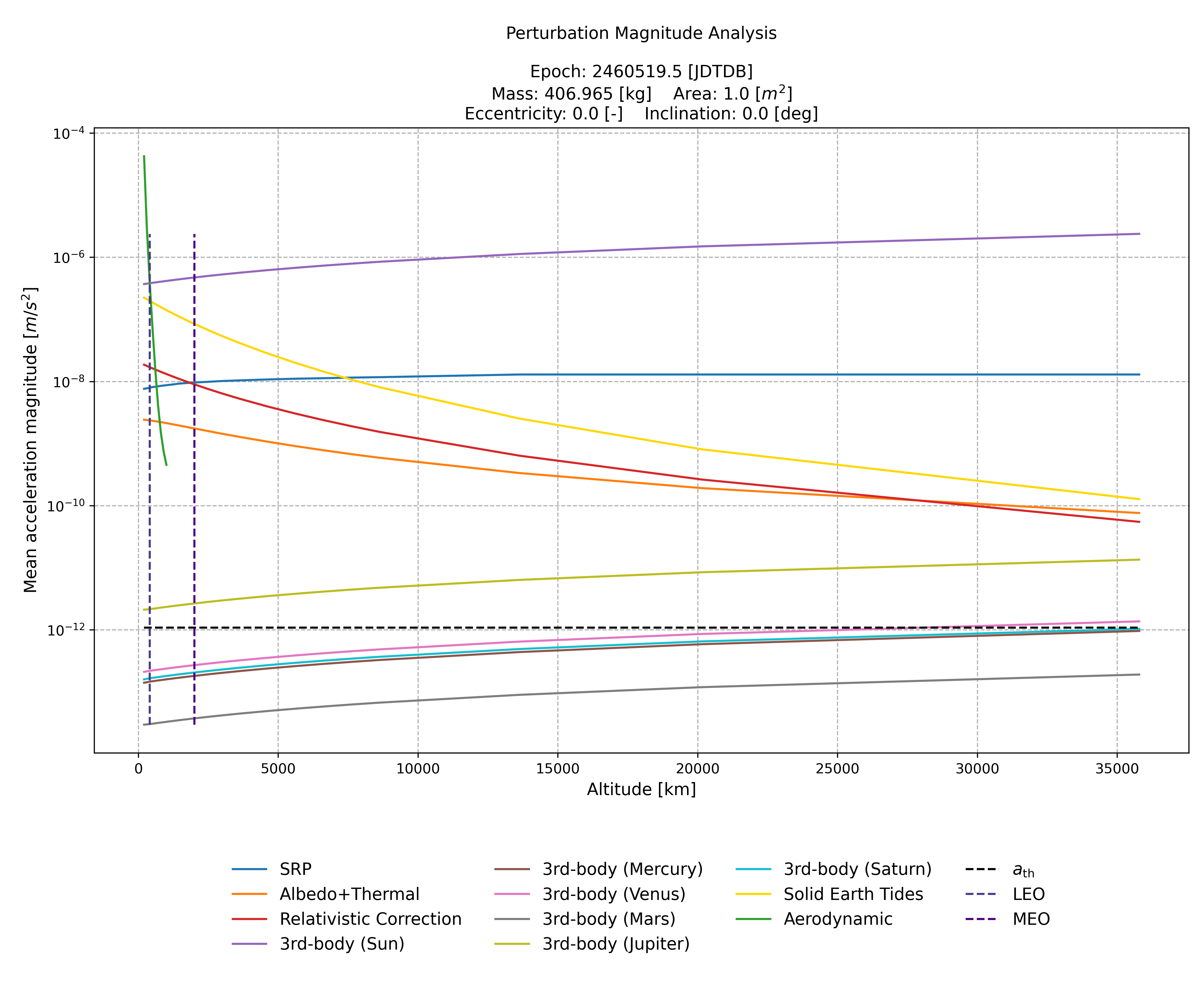 This figure was mostly used to determine the common acceleration types required at each orbital regime/altitude.
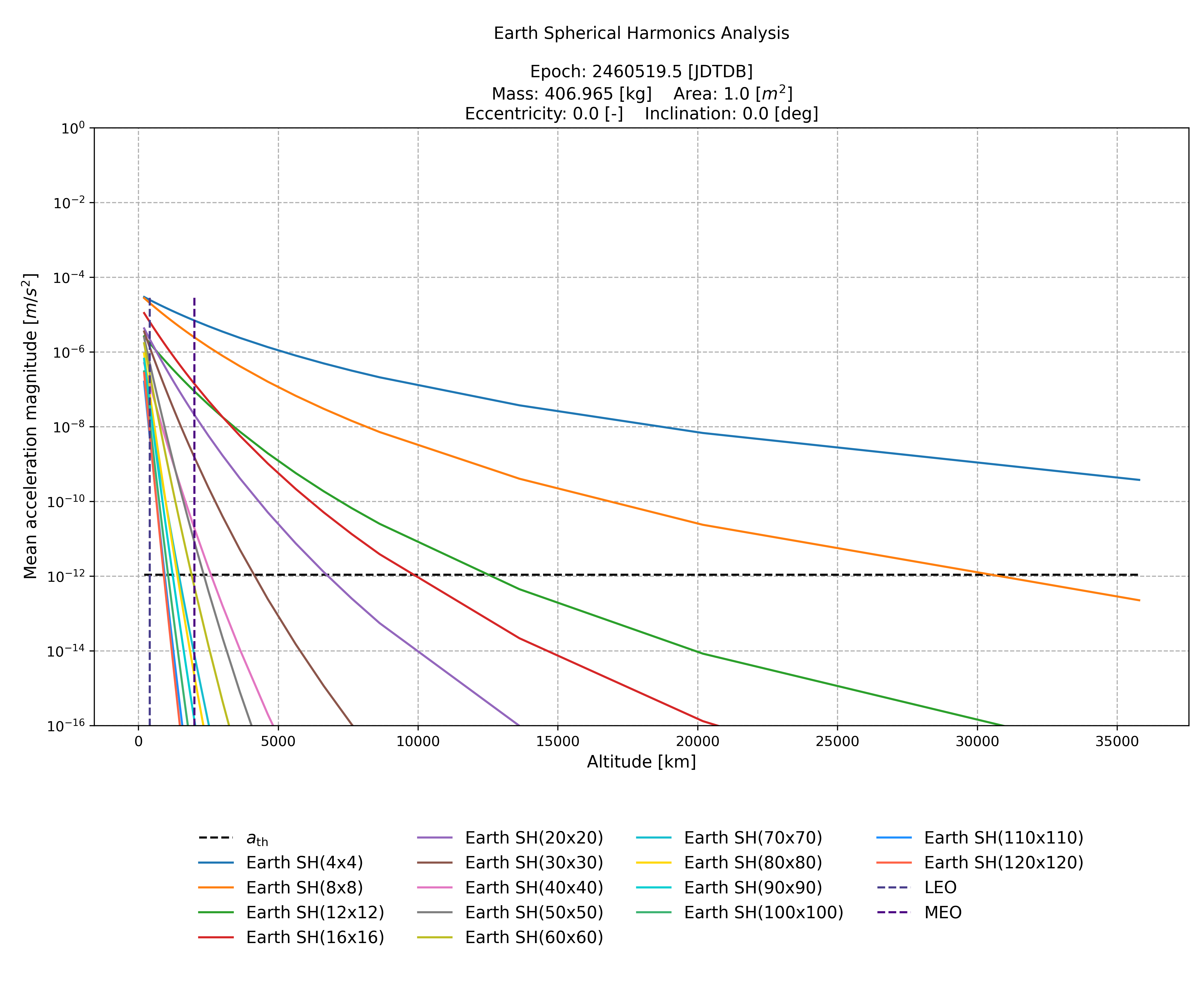 This figure was mostly used to determine the spherical harmonics degree and order for orbital regimes MEO and GEO.
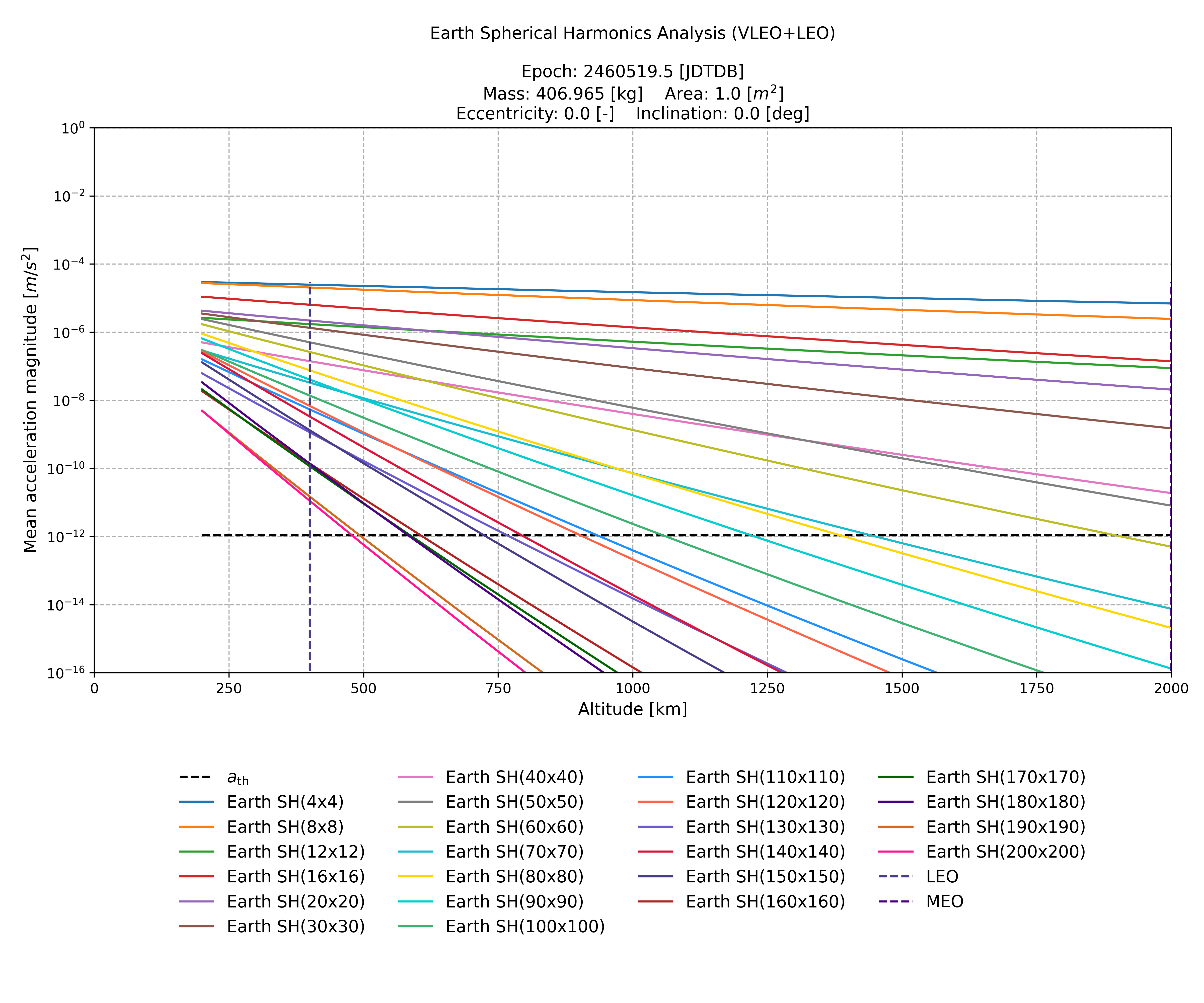 This figure was mostly used to determine the spherical harmonics degree and order for orbital regimes VLEO and LEO.
For the user's information, the Low Earth Orbit (LEO) is split into 2 stages only to prevent having the aerodynamic acceleration in the 1000-2000 [km] altitude range, and such orbital regimes are not commonly defined in the literature. In order to select which pre-defined propagator settings to be used in the simulation, the following line should be used:
mds_api.setPredefinedPropagationSettings(
    <Satellite Name>,
    mds_api.PredefinedPropagationSettings.<Settings Name>
)
The <Settings Name> can be VLEO, LowLEO, HighLEO, MEO, and GEO. For every pre-defined setting, the following are used for the environment model, integrator, and propagation method:
-
Environment model:
- Default spherical harmonic gravity field models in TUDAT:
- Earth: GOCO05c
- Moon: GGGRX1200
- Mars: JGMRO120d
- Venus: SHGJ180u
- Mercury: JGMESS160a
- High-fidelity rotation model with the IAU convention of IAU2006
- Default atmosphere model in TUDAT:
- Earth: US76 density model
- No model defined for other bodies by default
- High-fidelity Albedo and Thermal radiation models
- Solid tides for Earth
- J2000 (ICRF) as the reference frame orientation
- Default spherical harmonic gravity field models in TUDAT:
-
Integrator:
- Type: Variable-step
- Numerical scheme: Runge-Kutta-Fehlberg 8(9)
- Absolute tolerance: 1.0E-14
- Relative tolerance: 1.0E-14
- Minimum allowed time step: 1.0 [ms]
- Maximum allowed time step: 60.0 [s]
- Step size control algorithm: Based on position and velocity vector magnitudes (block-wise)
-
Propagation method: Cowell
Moon
There are 3 pre-defined propagator settings based on different orbital regimes for orbits around the Moon:
- Common settings for the acceleration model:
- Solar radiation pressure
- 3rd-body perturbations (Earth, Sun)
- Relativistic correction
- Albedo and thermal radiation pressure by Moon
| Settings Name | Moon Spherical Harmonics (max. degree × max. order) | Extra accelerations |
|---|---|---|
| LLO | 100 × 100 | Jupiter 3rd-body |
| MLO | 20 × 20 | – |
| HLO | 10 × 10 | – |
The <Settings Name> can be LLO, MLO, and HLO. For every pre-defined setting, the following are used:
- Environment model:
- Default spherical harmonic gravity field models in TUDAT
- Default rotation model
- No atmosphere model
- No solid tides
- High-fidelity albedo and thermal radiation models
-
J2000 (ICRF) as the reference frame orientation
-
Integrator: Same as Earth settings
- Propagation method: Same as Earth settings
Mars
There are 2 pre-defined propagator settings based on different orbital regimes for orbits around Mars:
- Common settings for the acceleration model:
- Solar radiation pressure
- 3rd-body perturbations (Sun, Jupiter)
- Relativistic correction
| Settings Name | Mars Spherical Harmonics (max. degree × max. order) | Extra accelerations |
|---|---|---|
| LMO | 80 × 80 | Earth 3rd-body |
| HMO | 10 × 10 | – |
The <Settings Name> can be LMO and HMO.
- Environment model:
- Default spherical harmonic gravity field models in TUDAT
- Default rotation model
- No atmosphere model
- No solid tides
- No albedo or thermal radiation
-
J2000 (ICRF) as the reference frame orientation
-
Integrator: Same as Earth settings
- Propagation method: Same as Earth settings
Venus
There are 2 pre-defined propagator settings based on different orbital regimes for orbits around Venus:
- Common settings for the acceleration model:
- Solar radiation pressure
- 3rd-body perturbations (Sun, Earth)
- Relativistic correction
| Settings Name | Venus Spherical Harmonics (max. degree × max. order) | Extra accelerations |
|---|---|---|
| LVO | 60 × 60 | Jupiter 3rd-body |
| HVO | 10 × 10 | – |
The <Settings Name> can be LVO and HVO.
- Environment model:
- Default spherical harmonic gravity field models in TUDAT
- Default rotation model
- No atmosphere model
- No solid tides
- No albedo or thermal radiation
-
J2000 (ICRF) as the reference frame orientation
-
Integrator: Same as Earth settings
- Propagation method: Same as Earth settings
Mercury
There are 2 pre-defined propagator settings based on different orbital regimes for orbits around Mercury:
- Common settings for the acceleration model:
- Solar radiation pressure
- 3rd-body perturbations (Sun)
- Relativistic correction
| Settings Name | Mercury Spherical Harmonics (max. degree × max. order) | Extra accelerations |
|---|---|---|
| LMeO | 40 × 40 | 3rd-body perturbations (Venus, Earth, Jupiter) |
| HMeO | 10 × 10 | - |
The <Settings Name> can be LMeO and HMeO.
- Environment model:
- Default spherical harmonic gravity field models in TUDAT
- Default rotation model
- No atmosphere model
- No solid tides
- No albedo or thermal radiation
-
J2000 (ICRF) as the reference frame orientation
-
Integrator: Same as Earth settings
- Propagation method: Same as Earth settings
Jupiter
There are 2 pre-defined propagator settings based on different orbital regimes for orbits around Jupiter:
- Common settings for the acceleration model:
- Solar radiation pressure
- 3rd-body perturbations (Sun)
- Relativistic correction
| Settings Name | Jupiter Spherical Harmonics (max. degree × max. order) | Extra accelerations |
|---|---|---|
| LJO | 10 × 10 | 3rd-body perturbations (Io, Europa, Ganymede, Callisto) |
| HJO | 2 × 2 | Saturn 3rd-body |
The <Settings Name> can be LJO and HJO.
- Environment model:
- Default spherical harmonic gravity field models in TUDAT
- Default rotation model (IAU2006)
- No atmosphere model
- No solid tides
- No albedo or thermal radiation
-
J2000 (ICRF) as the reference frame orientation
-
Integrator: Same as Earth settings
- Propagation method: Same as Earth settings
Saturn
There are 2 pre-defined propagator settings based on different orbital regimes for orbits around Saturn:
- Common settings for the acceleration model:
- Solar radiation pressure
- 3rd-body perturbations (Sun)
- Relativistic correction
| Settings Name | Saturn Spherical Harmonics (max. degree × max. order) | Extra accelerations |
|---|---|---|
| LSO | 10 × 10 | Titan 3rd-body |
| HSO | 2 × 2 | Jupiter 3rd-body |
The <Settings Name> can be LSO and HSO.
- Environment model:
- Default spherical harmonic gravity field models in TUDAT
- Default rotation model
- No atmosphere model
- No solid tides
- No albedo or thermal radiation
-
J2000 (ICRF) as the reference frame orientation
-
Integrator: Same as Earth settings
- Propagation method: Same as Earth settings
Sun (heliocentric)
There is 1 pre-defined propagator setting for heliocentric orbits:
- Acceleration model:
- Sun point-mass gravity
- Solar radiation pressure
- 3rd-body perturbations (Mercury, Venus, Earth, Mars, Jupiter)
- Relativistic correction
The <Settings Name> is InnerSolar.
- Environment model:
- Point-mass gravity field
- Default rotation model
- No atmosphere model
- No solid tides
- No albedo or thermal radiation
-
J2000 (ICRF) as the reference frame orientation
-
Integrator: Same as Earth settings
- Propagation method: Same as Earth settings
Available Settings
The current interface of TUDAT in MDS currently supports the modification of the following settings in a propagation:
-
Fully customizable acceleration model
- Spherical harmonic gravity acceleration up to degrees and orders of the user's choice
- 3rd-body accelerations as point-mass gravity acceleration
- Radiation pressure, either from Sun (Solar) or the central body of orbit (Albedo, Thermal)
- Aerodynamic acceleration (Drag)
- Relativistic correction acceleration, including the Schwarzschild and DeSitter terms
-
Fully customizable integrator settings
- Integrator type, either fixed-step or variable-step
- Numerical scheme:
- Euler
- RK4
- RKF1(2)
- RKF4(5)
- RKF5(6)
- RKF7(8)
- RK8(7) Dormand Prince
- RKF8(9)
- Runge-Kutta-Verner 8(9)
- Runge-Kutta-Feagin 10(8)
- Runge-Kutta-Feagin 12(10)
- Runge-Kutta-Feagin 14(12)
- Following parameters for the variable-step integrator:
- Absolute and relative tolerances
- Minimum and maximum allowed time steps
- Step size control algorithm, either based on every state component or on blocks of state vector, such as position and velocity magnitudes
-
Propagation method for translational states (position and velocity)
- Cowell
- Encke
- Gauss Keplerian
- Gauss Modified Equinoctial
- Unified State Model (USM) methods:
- Quaternions
- Modified Rodrigues Parameters
- Exponential Map
-
Environment model
- Simulation reference frame orientation, either J2000 (ICRF) or ECLIPJ2000, centered at the central body:
- J2000 by default
- Spherical harmonic gravity field model:
- Earth:
- EGM96
- GGM02c
- GGM02s
- GOCO05c (default)
- Moon:
- GLGM3150
- LPE200
- GGGRX1200 (default)
- Mars:
- JGMRO120d (default)
- Mercury:
- JGMESS160a (default)
- Venus:
- SHGJ180u (default)
- Earth:
- High-fidelity rotation model for Earth and Mars:
- IAU conventions supported for Earth:
- IAU2000a
- IAU2000b
- IAU2006 (default)
- IAU conventions supported for Earth:
- NRLMSISE-00 high-fidelity atmosphere model for Earth, with the option to use a custom Space Weather Data file:
- A new version of the file can be downloaded from Celestrak
- Disabled by default
- Albedo and Thermal radiation models for Earth and Moon:
- User can choose which radiation(s) to include
- There are 2 models available for Earth and Moon:
- High-fidelity (default)
- Constant
- Solid tides for Earth:
- Tidal deformation caused by Sun and Moon
- Love numbers are taken from the IERS Conventions (2010) Table 6.3, where the Anelastic Earth model is used for degree 2
- Enabled by default
- Simulation reference frame orientation, either J2000 (ICRF) or ECLIPJ2000, centered at the central body:
The satellites are currently modelled as spheres (cannonball) with a cross-section area, drag coefficient, and a radiation pressure coefficient, which are used in the calculation of aerodynamic and radiation pressure accelerations.
Custom Propagator Settings
The pre-defined propagator settings are tailored for simulations around Earth, as this corresponds to the majority of use cases of MDS, but the settings are highly customizable and can be modified according to the needs of the user. It is recommended to customize the propagator settings for simulating orbits around central bodies other than Earth. Every function that will be mentioned in this section must be called before adding a satellite to the scene so that the settings can take effect.
Acceleration Model
The acceleration model can be modified or set up completely from scratch using the following function:
mds_api.add_acceleration(
  <Satellite Name>,
  <Natural Body name>,
  mds_api.AccelerationType.<Acceleration Type>,
  <Spherical Harmonics Degree> = -1,
  <Spherical Harmonics Order> = -1
)
The <Acceleration Type> can be point-mass gravity, spherical harmonic gravity, radiation pressure, aerodynamic, and relativistic correction. The last two arguments, as their names suggest, are only relevant for the spherical harmonic gravity acceleration and will be ignored for other acceleration types.
If mds_api.add_acceleration is called after setting a pre-defined propagation setting for a satellite, it will modify the acceleration model.
When the user intends to set up an acceleration model from scratch, there must be no pre-defined propagation setting defined for the satellite, so mds_api.add_acceleration will clear the acceleration model, and user will be responsible for entering a physically-feasible model.
An acceleration model is considered physically-feasible when it meets the following requirements:
- Any body shall not have both the point-mass and spherical harmonic gravity accelerations defined.
- Central body shall have a gravity acceleration defined, either point-mass or spherical harmonic.
- Any body shall not have any duplicate acceleration type.
Environment Model
There are multiple functions present to modify the environment model for the simulation of a single satellite or a constellation, specific to different aspects of an environment model.
The simulation reference frame orientation can be modified using:
mds_api.modify_simulation_reference_frame(
  <Satellite Name>,
  mds_api.ReferenceFrames.<Reference Frame>
)
where <Reference Frame> can be either J2000 or ECLIPJ2000
The spherical harmonic gravity field model can be modified using:
mds_api.modify_spherical_harmonics_model(
  <Satellite Name>,
  <Natural Body Name>,
  mds_api.SphericalHarmonicGravityFieldModels.<Spherical Harmonics Model>
)
The <Spherical Harmonics Model> can be one of the models mentioned under the section 'Available Settings' for a certain central body.
The high-fidelity rotation model can be modified using:
mds_api.toggle_central_body_high_fidelity_rotation_model(
  <Satellite Name>,
  <Natural Body Name>,
  <Use High-Fidelity Rotation Model>,
  mds_api.IAUConventions.<IAU Convention>
)
A simpler rotation model can be used by setting <Use High-Fidelity Rotation Model> False, and <IAU Convention> is only relevant for the rotation model of Earth.
The high-fidelity atmosphere model NRLMSISE-00 for Earth can be enabled using:
mds_api.toggle_central_body_high_fidelity_atmosphere_model(
  <Satellite Name>,
  <Natural Body Name>,
  <Use NRLMSISE>,
  <Space Weather File Path>
)
The argument <Use NRLMSISE> determines whether to enable the model, and <Space Weather File Path> should be the absolute path of the Space Weather Data file text file.
The Albedo and Thermal radiation pressure accelerations can be configured using:
mds_api.modify_central_body_radiation_source_model(
  <Satellite Name>,
  <Natural Body Name>,
  mds_api.RadiationSourceModelTypes.<Radiation Source Model Type>, <Include Albedo Radiation>,
  <Include Thermal Radiation>
)
The argument <Radiation Source Model Type> can either be high-fidelity or constant to determine what model will be used to determine the radiation emitted by the central body.
The solid tides for Earth can be configured using:
mds_api.modify_gravity_field_variations_model(
  <Satellite Name>,
  <Natural Body Name>,
  mds_api.GravityFieldVariationsModelTypes.<Gravity Field Variation Model Type>
)
The argument <Gravity Field Variation Model Type> can only be empty or default, where default model type is what is given in section 'Available Settings' and empty means no solid tides for Earth. By default, the solid tides are enabled for Earth, which is only relevant for simulations around Earth, so this setting must be manually disabled by the user for propagations around different bodies.
Integrator
There are three functions responsible for modifying the integrator being used in the simulation.
In order to change the integrator type, the following function can be used:
mds_api.modify_integrator_type(
  <Satellite Name>,
  <Use Variable-Step Integrator>
)
Setting the argument <Use Variable-Step Integrator> False would enable the fixed-step integrator.
The numerical scheme of the integrator can be modified using:
mds_api.modify_integrator_numerical_scheme(
  <Satellite Name>,
  mds_api.Integrators.<Numerical Scheme>,
  mds_api.IntegratorOrderToUse<Order To Use>
)
The argument <Numerical Scheme> can be one of the schemes mentioned in the 'Available Settings' section, and <Order To Use> is only relevant for fixed-step integrator to choose which order of the numerical scheme to choose. For example, RKF89 with the lower order to use would effectively make the integrator RK8.
For variable-step integrators, the following function can be used to modify the parameters specific to them:
mds_api.modify_variable_step_integrator_extra_parameters(
  <Satellite Name>,
  <Absolute Tolerance>,
  <Relative Tolerance>,
  <Minimum Time Step>,
  <Maximum Time Step>,
  <Use Per Element Step Size Control>
)
The integrator won't be allowed to get out of the range of step sizes determined by the arguments <Minimum Time Step> and <Maximum Time Step>. When <Use Per Element Step Size Control> is false, which is the default setting, the integrator step size will be controlled based on the position and velocity vector magnitudes from the state vector. This means that the block-wise control algorithm can only be used with a Cowell propagation method, and it will be converted to an element-wise algorithm automatically for other methods. The reason is that the state vector is not composed of cartesian position and velocity elements for propagation methods other than Cowell, so the next step size is determined by evaluating each state component separately.
Propagation Method
The translational propagation method can be modified using:
mds_api.modify_translational_propagator_type(
  <Satellite Name>,
  mds_api.PropagatorTypes.<Propagator Type>
)
The argument <Propagator Type> can be one of the propagation methods given in section 'Available Settings', and the Cowell method is the default setting.