Camera subsystem
The MDS camera subsystem is designed to simulate realistic imaging using Unity’s physical camera model. It leverages the capabilities described in the official Unity documentation.
Key characteristics:
- Camera can be configured using physical camera parameters
- Support for parasitic optical effects (lens flare, blur, grain, abberations).
- Real-time lighting simulation using Ray Tracing.
- Lighting, brightness, material properties, etc configuragle through the API.
- Integration with custom satellite models.
- Ability to have a real-time camera feed for closed-loop vision-based algorithm testing.
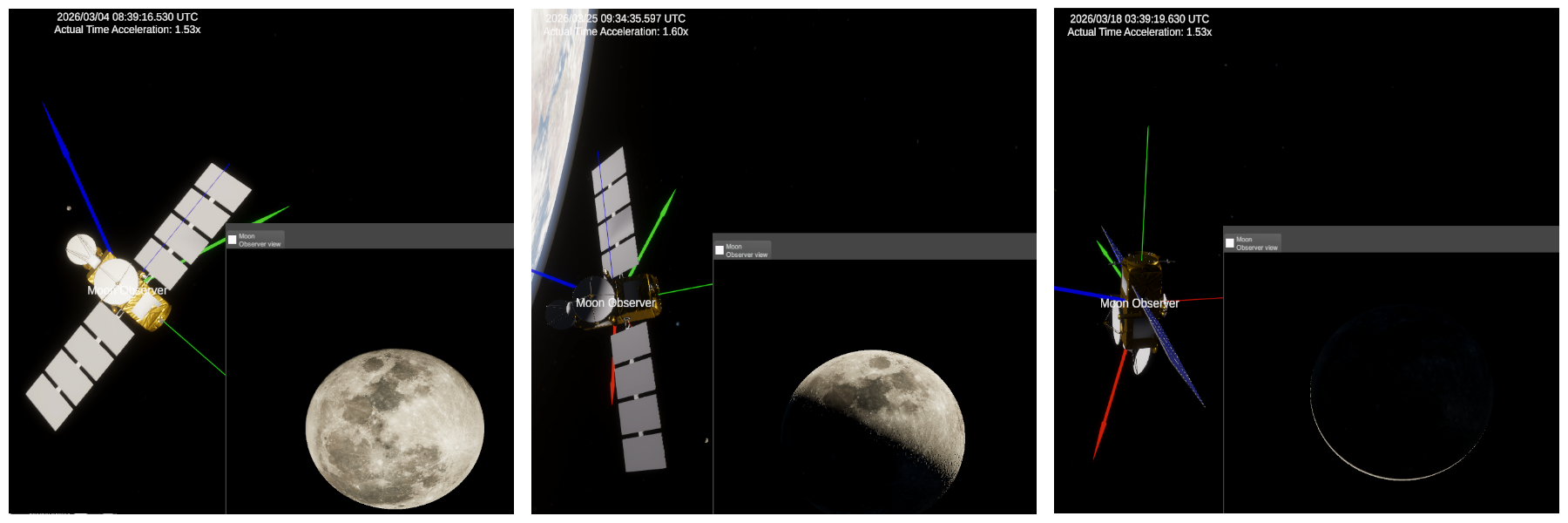
An example of MDS lighting simulations integrated with planetary simualtions- you are able to distinguish Moon phases in a sample scene based on the date.
Use cases
The camera subsystem is suitable for:
- Synthetic dataset generation (computer vision, ML)
- Spacecraft imaging mission simulation
- Testing spacecraft visual navigation algorithms
- Testing camera camera configurations based on mission needs
- Testing sensor fusion algorithms
- MIL/SIL/HIL testing
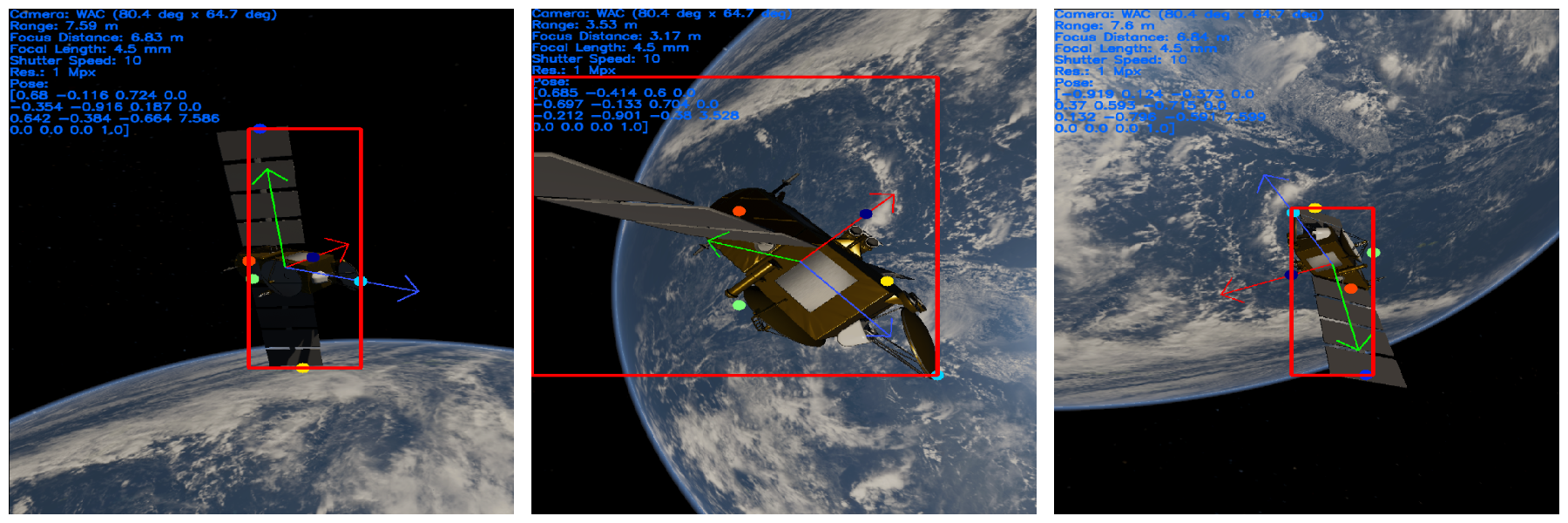
In these pictures you can see usage of MDS camera system for synthetic dataset generation. With both truth data and image outputs, one can directly generate training data for vision-based algorithms. This architecture is provided in
example_dataset_generation.py.
Physical Camera Model
The subsystem models a camera using physical parameters, allowing accurate simulation of real-world optics.
Core Parameters
These parameters are exposed through the mds_api.attach_camera_to_sat() function:
-
Focal Length (mm)
Controls field of view and magnification. -
Near Plane (m)
Minimum rendering distance (objects closer are clipped). -
Far Plane (m)
Maximum rendering distance. -
Sensor Size (mm)
sensor_size_x: horizontal size-
sensor_size_y: vertical size
Affects field of view and aspect ratio. -
Lens Shift
lens_shift_x-
lens_shift_y
Simulates off-center lenses (useful for stereo rigs or misalignment). -
Gate Fit Mode
Defines how the sensor maps to the rendered image: Vertical– fit verticallyHorizontal– fit horizontallyFill– sensor fully fits inside frameOverscan– frame fully fits inside sensor-
None– stretch to match -
ISO
Controls sensor sensitivity (affects brightness/noise realism). -
Shutter Speed
Controls exposure duration. -
Focus Distance (m)
Determines focal plane distance. -
Aperture (f-stop)
Controls depth of field and exposure.
For more detailed api description see mds_api reference document.
Higher-level Camera modules in the API
This module allows you to save camera and load presets/modify them directly without having to recreate the camera using the base function mds_api.attach_camera_to_sat().
from mds_api import MDSCamera

# Create camera
camera = MDSCamera(
    satellite=sat_name,
    preset="NAC",
    )

# Now you can change parameters like this:
camera.change_attributes(focus_distance=8)
Some presets are already available- Narrow Angle Camera or a Wide Angle Camera [NAC/WAC]
For usage example see
example_camera_class_interface.py.
Optical effects
To improve realism, the subsystem models several real-world optical imperfections or effects:
-
Lens Distortion
- Simulates geometric distortion from lenses
- Parameter:
lens_distortion_intensity
-
Bloom
- Simulates light bleeding from bright areas
- Parameter:
bloom_intensitybloom_scatter
-
Color Grain
- Simulates sensor noise
- Parameter:
color_grain_intensitycolor_grain_response
-
Chromatic Aberration
- Simulates wavelength-dependent distortion
- Parameter:
chromatic_aberration
-
Lens Flare
- Simulates internal reflections in lens systems
- Parameter:
enable_lens_flare
-
Depth of Field
- Enables depth of field in simulation
- Parameter:
enable_depth_of_field
Examples of these effects can be seen below:
1) Clear picture; 2) Out of focus (changing focus distance); 3) Color grain; 4) Narrow angle camera (NAC) preset; 5) Wide angle camera (WAC) preset; 6) Bloom; 7) Lens flare; 8) Chromatic aberration; 9) Lens distortion.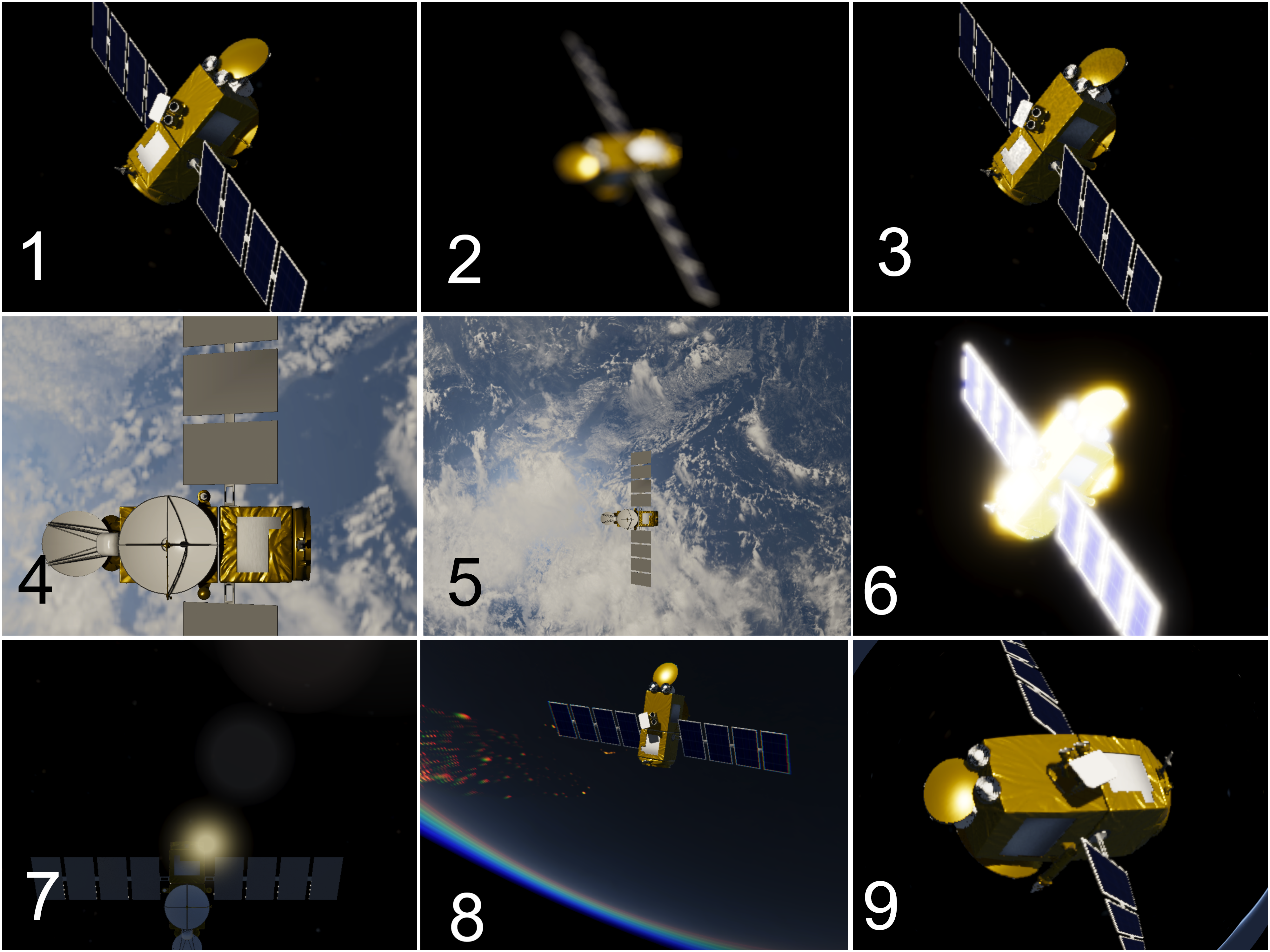
For more detailed effects examples see
example_physical_camera.py.
Image Retrieval
Several functions are available to retrieve the images in the API:
mds_api.get_camera_frame(sat_name: str)
Returns the rendered image frame.
RGB images are saved in PNG format.
For usage example see
example_capture_camera_image.py.
mds_api.get_camera_depth_frame(sat_name: str)
Returns depth information for the current frame.
Depth information is saved in a file named depth_x.float. This file contains the depth (distance from
the camera) for every visible pixel of the satellite.
The depth_x.float file is stored as a simple array of 32-bit floating-point values.
For usage example see
example_capture_camera_depth.py.
Finally, it is also possible through the UI. If you enable the Capture option, the camera's image and depth information will be automatically saved to the following folder: MDS Install Directory/Export/Capture/